Every alert in Ceburu follows the same lifecycle, whichever product raised it: log management, assets, network, databases or applications. This page explains that lifecycle: when an alert opens, what each status means, who gets emailed and when, and how an alert ends.
Each product's alert page covers its own rules and conditions.
At a glance: a rule runs a check on a schedule → a check that finds a problem opens an alert → the alert notifies, is worked and changes as the problem does → it ends when the problem clears, or when someone closes it.
Rules, checks and alerts:
- A rule is what you configure: what to check, the conditions, how often to check, and who to tell.
- A check is one run of a rule. Rules run on their own schedule, the Frequency.
- An alert is the record of one problem. It opens on the first check that finds the problem and stays open for as long as the problem lasts.
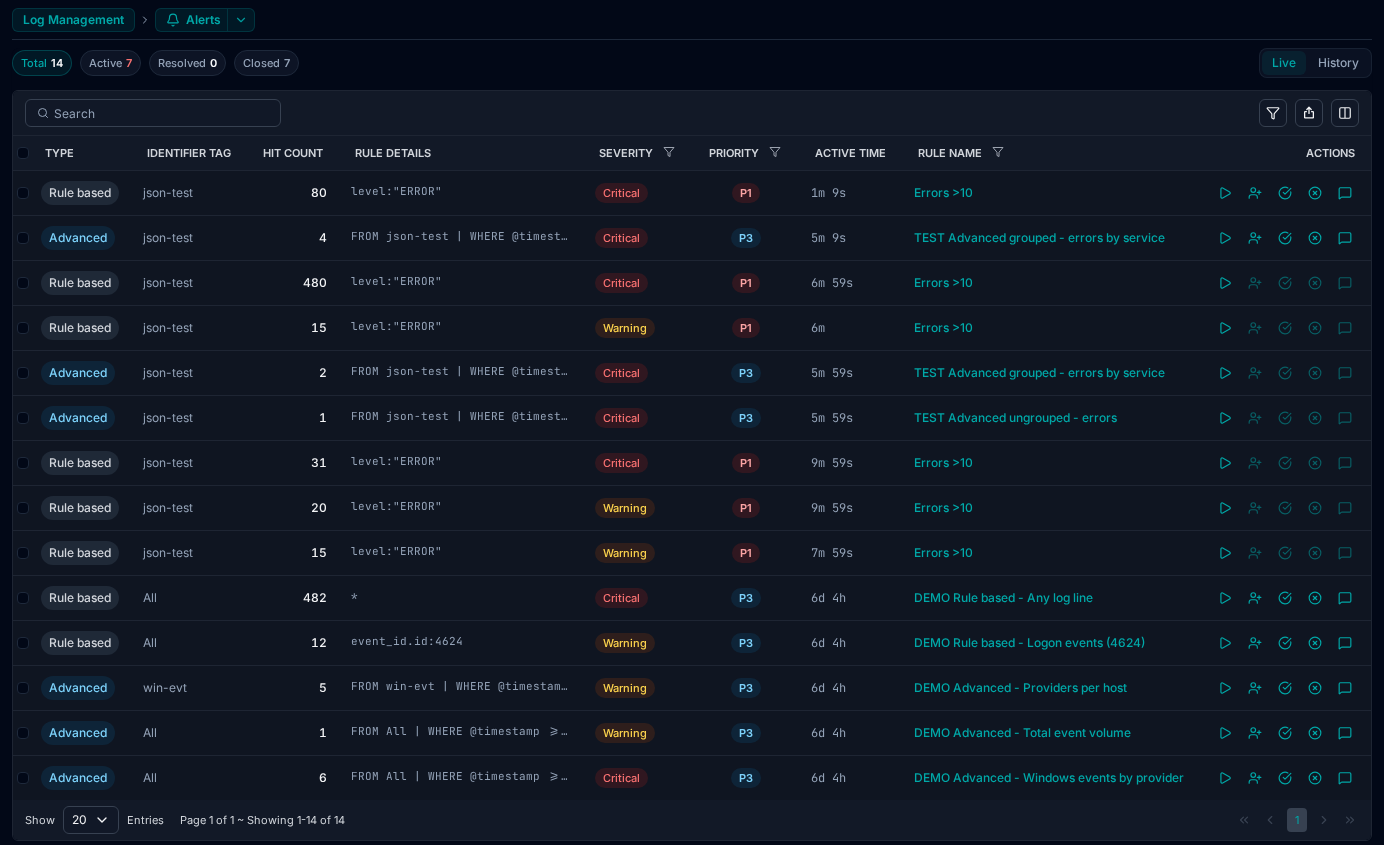
A rule raises one alert per problem, not one per check. A rule checked every five minutes that finds the same problem for two hours still has one alert, with two hours of history behind it. Where a rule watches many things at once (for example, one alert per device), each of them has its own alert.
The statuses:
Every status belongs to one of three stages:
| Stage | Status | Meaning |
|---|---|---|
| Still a problem | Active | The problem is happening and nobody has taken the alert yet. |
| Escalated | Nobody took the alert in time, so the next escalation step was told. | |
| Acknowledged | Someone has been assigned the alert and is working on it. | |
| Believed fixed | Auto resolved | The checks found the problem has cleared. The alert waits out the Auto close time, then closes. |
| Awaiting closure | The problem has cleared, and the rule asks a person to close the alert (Auto close is off). | |
| Manual resolved | Someone marked the alert resolved. The next checks confirm the fix before it closes. | |
| Ended | Closed | The alert has ended. The reason it closed is kept on the alert. |
| Cancelled | The rule was disabled or deleted while the alert was open. |
While an alert is believed fixed, a returning problem reopens the same alert instead of opening a new one. Once it has ended, a returning problem opens a new alert.
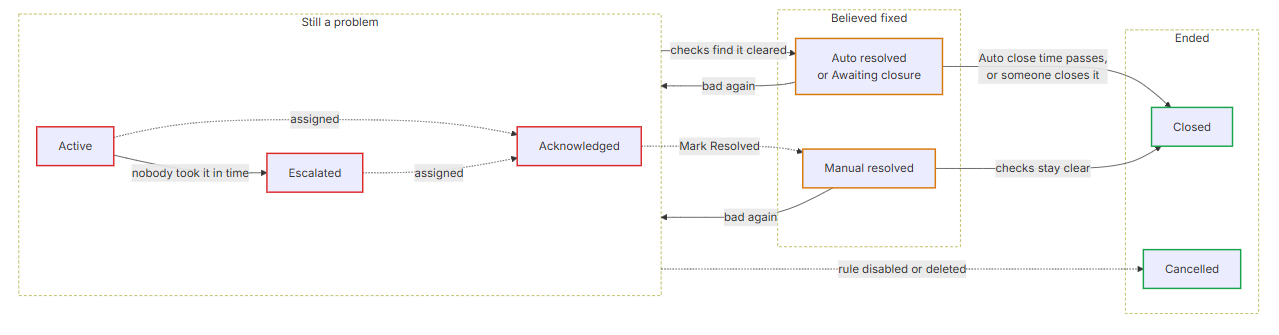
How to read it:
- Solid arrows happen on their own, from the checks or the clock. Dashed arrows are something a person does.
- An arrow from a box applies to every status in it. Whether the alert is Active, Escalated or Acknowledged, a clear check moves it to Auto resolved (or Awaiting closure, with Auto close off), and anyone can Mark Resolved.
- A problem that comes back returns the alert to where it was: Active, or Escalated if it had escalated, or Acknowledged if someone has it.
When an alert opens: A check that finds a problem doesn't always open an alert straight away. The rule's Trigger interval says how long the problem must last first.
- Trigger interval 0: the alert opens on the first check that finds the problem.
- Trigger interval 10 minutes: the problem must still be there on checks covering 10 minutes. A spike that clears sooner never opens an alert.
- While a problem is building up, or an alert is waiting to close, the rule checks more often than its Frequency: about five times within the Trigger interval or Auto close time, and never more often than once a minute. That is so a 10-minute Trigger interval opens the alert close to the 10-minute mark, not a whole Frequency later. The rule goes back to its normal Frequency once the problem has settled either way.
Severity:
Each alert carries a severity, set by the rule's conditions:
- Critical and Warning are the levels most rules use. A rule can have conditions for one or both; the worst level met sets the severity.
- The severity moves with the problem. If a Warning alert gets worse and meets the Critical conditions, the same alert becomes Critical and an email goes out. If it improves, it drops back to Warning. That is written on the alert's timeline but doesn't send an email.
- Priority (P1 to P4) is different. You set it on the rule to say how much the rule matters. Every alert the rule opens carries it, and it never changes with the readings.
When an alert ends:
On its own
When the checks no longer find the problem, the alert has recovered.
- Auto close on: the alert moves to Auto resolved and waits out the Auto close time. If the checks stay clear, it closes as Recovered. If the problem comes back first, the same alert goes back to where it was (Active, Escalated or Acknowledged).
- Auto close off: the alert moves to Awaiting closure and an email asks someone to close it. If nobody does within 7 days, it closes as Closed unconfirmed. A problem that returns before then reopens it.
- Auto close exists so a problem that clears for one check and comes straight back doesn't open and close a stream of alerts. Set it longer for something that flaps, shorter for something you want off the board quickly.
By hand
| Action | What happens |
|---|---|
| Mark Resolved | The alert moves to Manual resolved. The next checks confirm the fix: if they stay clear, it closes as Resolved by user. If the problem is still there, the alert reopens and the person who resolved it is emailed. |
| Close Alert | The alert closes straight away, without waiting for the checks. Use it for an alert you no longer need, for example a planned outage. If the problem is still happening, the next check opens a new alert. |
Both ask for an optional note, which is kept on the alert's timeline.
When the rule changes:
- Disabling or deleting a rule cancels its open alerts, with the reason Config disabled or Config deleted. Cancelled is not a resolution: nobody checked that the problem was fixed.
- Editing a rule keeps its open alerts. Each alert keeps a copy of the rule as it was when the alert opened, so its history stays readable after the rule changes.
Who is emailed, and when:
Alerts email the notification channels chosen on the rule. A rule with no channels still opens alerts and shows them in the list, but emails nobody, which is useful while a rule is being tuned.
Emails are sent when something changes, never on every check:
| When | |
|---|---|
| Alert opened | The alert opens. |
| Severity raised | The alert gets worse, for example Warning to Critical. Sent even while notifications are paused. |
| Waiting to be closed | The problem cleared and Auto close is off. |
| Relapsed | The problem came back after a Waiting to be closed email. Sent once per alert, so an alert that keeps flapping doesn't keep emailing. |
| Reopened | Someone marked the alert resolved and a check found the problem again. Sent to that person as well as the channels. |
| Reminder | The alert is still open and nobody is on it, every Remind every interval. |
| Escalated | The alert has been open for the step's time without being taken. Sent to that step's channel. |
| Assigned | Someone was given the alert. |
| Resolved / Closed | The alert ended. Sent to the channels and the assignee. |
Every alert email links to the alert in Ceburu ("View alert").
Working an alert:
Assign:
Assign gives the alert to a person, by email address, and moves it to Acknowledged. The assignee doesn't need a Ceburu account.
Assigning also pauses the alert's reminders and escalation for a while (30 minutes unless the rule says otherwise), so the team isn't emailed about something that is already being handled. A pause holds those emails rather than cancelling them:
- When the pause ends, the assignee is emailed and has five minutes to extend it, by assigning the alert to themselves again.
- After that, reminders and escalation pick up where they left off.
- A severity rise is always emailed, pause or not.
Reminders and escalation:
Both are set on the rule, under Notification Preferences:
- Reminder emails the rule's channels again every Remind every interval while the alert is open and nobody has taken it.
- Escalation emails one more channel per step, after each step's time, for example the team lead after 15 minutes and the on-call manager after an hour. Once an alert has escalated it stays escalated until someone takes it.
Comments and the timeline:
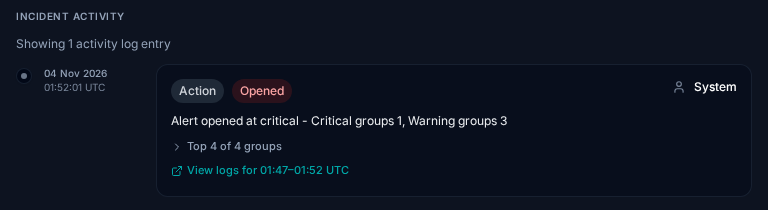
Each alert keeps a timeline of what happened to it: opened, severity changes, recovered, reopened, assigned, comments and closed. The timeline records changes only, not every check, so it stays readable for an alert that was open for days.
| Setting | What it controls | Off / 0 means |
|---|---|---|
| Frequency | How often the rule checks. | — |
| Trigger interval | How long a problem must last before the alert opens. | Open on the first bad check. |
| Auto close (switch) | Whether a recovered alert closes itself. | It waits for a person, up to 7 days. |
| Auto close (time) | How long a recovered alert must stay clear before it closes. | Close on the first clear check. |
| Notification channels | Who is emailed. | Nobody; alerts still open. |
| Remind every | How often an untaken alert is emailed again. | No reminders. |
| Escalation | Who else is told, and after how long. | No escalation. |
| Priority | How much the rule matters (P1 to P4). | — |
Durations can be set up to 7 days.
Was this article helpful?
That’s Great!
Thank you for your feedback
Sorry! We couldn't be helpful
Thank you for your feedback
Feedback sent
We appreciate your effort and will try to fix the article