Ceburu ServiceNow EM Events Connector Setup
Status: Coming soon / not production-ready. The API-key workflow is available in the current UI, and this page records the intended alarms API contract from the current code. Do not enable a production polling schedule or promise customer availability until the EM Events connector release is approved.
Common API-key walkthrough: Service Graph Connector setup video
What this connector will do
The Ceburu ServiceNow EM Events connector will pull active, updated, and resolved Ceburu alarms and submit ServiceNow-ready records to em_event.
Ceburu alarms
        ↓ one versioned alarms endpoint
 ServiceNow EM Events connector
        ↓ stable message key + lifecycle
 ServiceNow em_event → alerts and CI binding
This connector is only for alarms/events. It must not use the Service Graph inventory, health, device, specification, or interface endpoints.
Before you begin
For pre-release validation, confirm that you have:
- Ceburu access that permits API-key management.
- The correct customer selected in the Ceburu portal.
- An approved non-production validation plan.
- A secure ServiceNow credential location for the raw key.
- A release decision confirming when the endpoint and connector may be used.
Generate a dedicated EM Events key. Do not reuse a Service Graph key.
Generate the EM Events API key
The navigation, scope, rate-limit, expiration, one-time secret, rotation, and revocation steps are the same as for the Graph connector. The connector type selection is different and automatically gives this key a different endpoint allowlist.
1. Open Manage API Keys
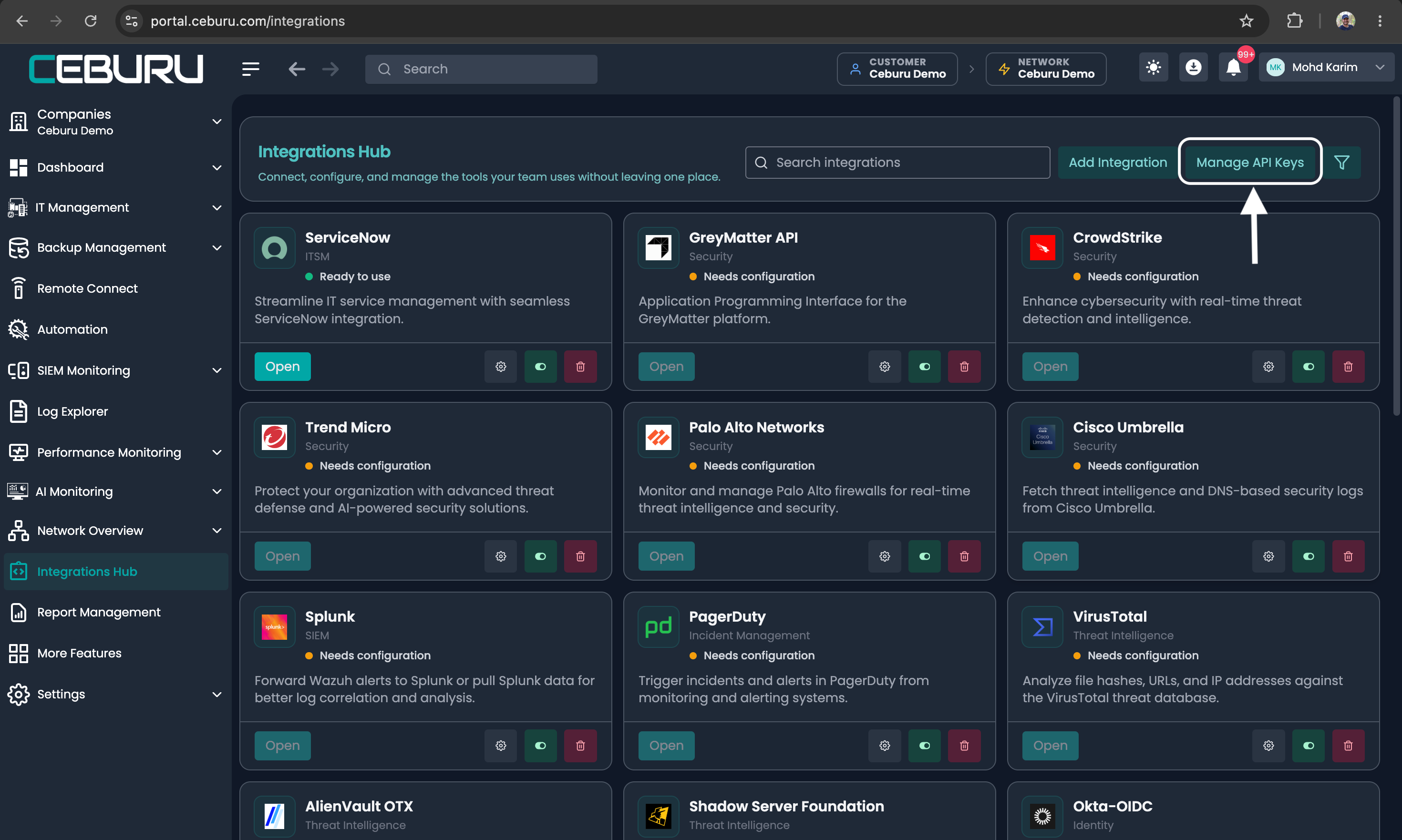
In Ceburu, select the intended customer, open Integrations Hub, and select Manage API Keys.
Integrations Hub with Manage API Keys highlighted
2. Start key generation
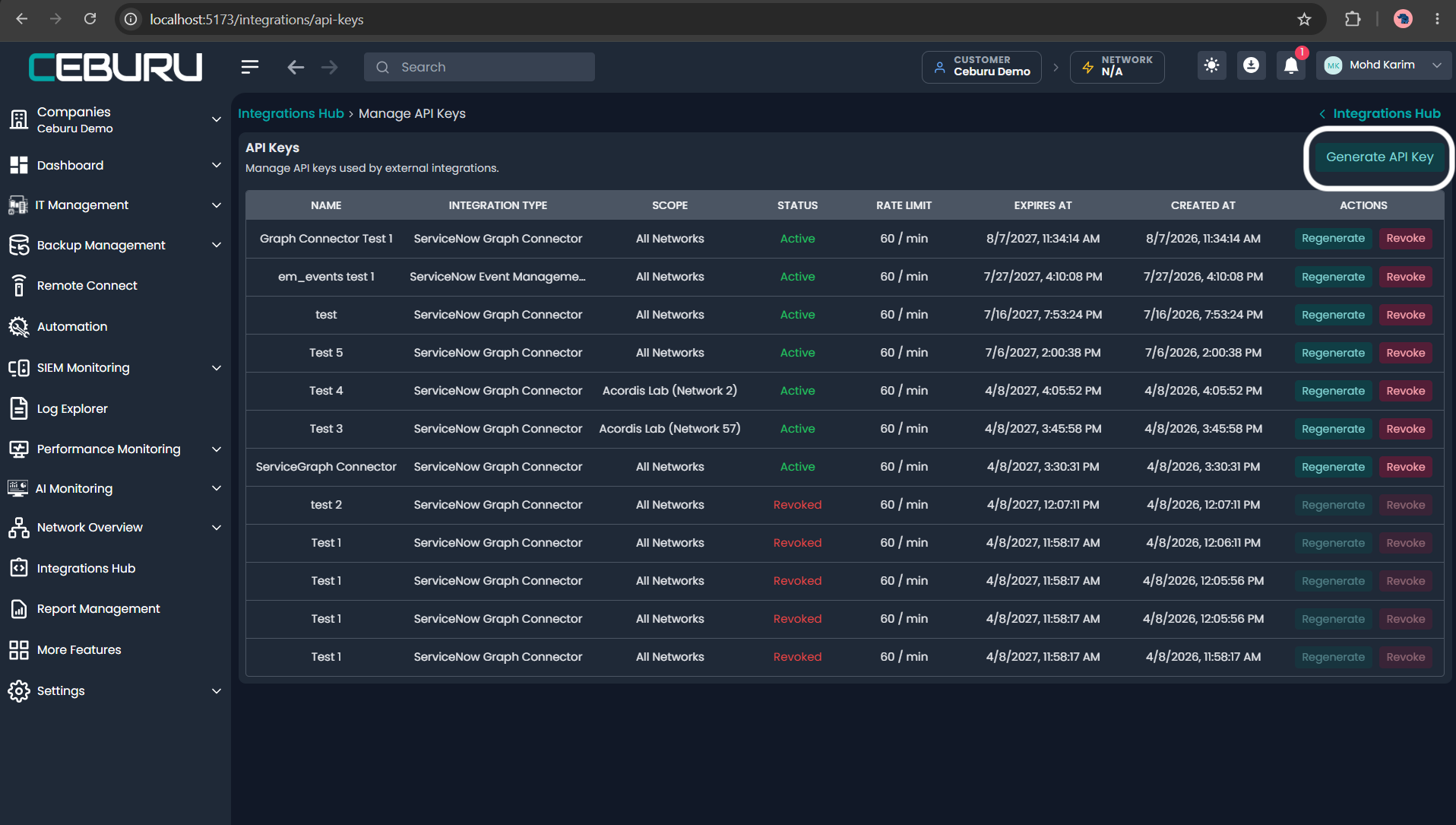
On the API Keys page, select Generate API Key.
Manage API Keys with Generate API Key highlighted
3. Select the connector type
Open Integration Type and select ServiceNow Event Management (em_event) Connector.
Integration Type menu showing ServiceNow Event Management and Graph options
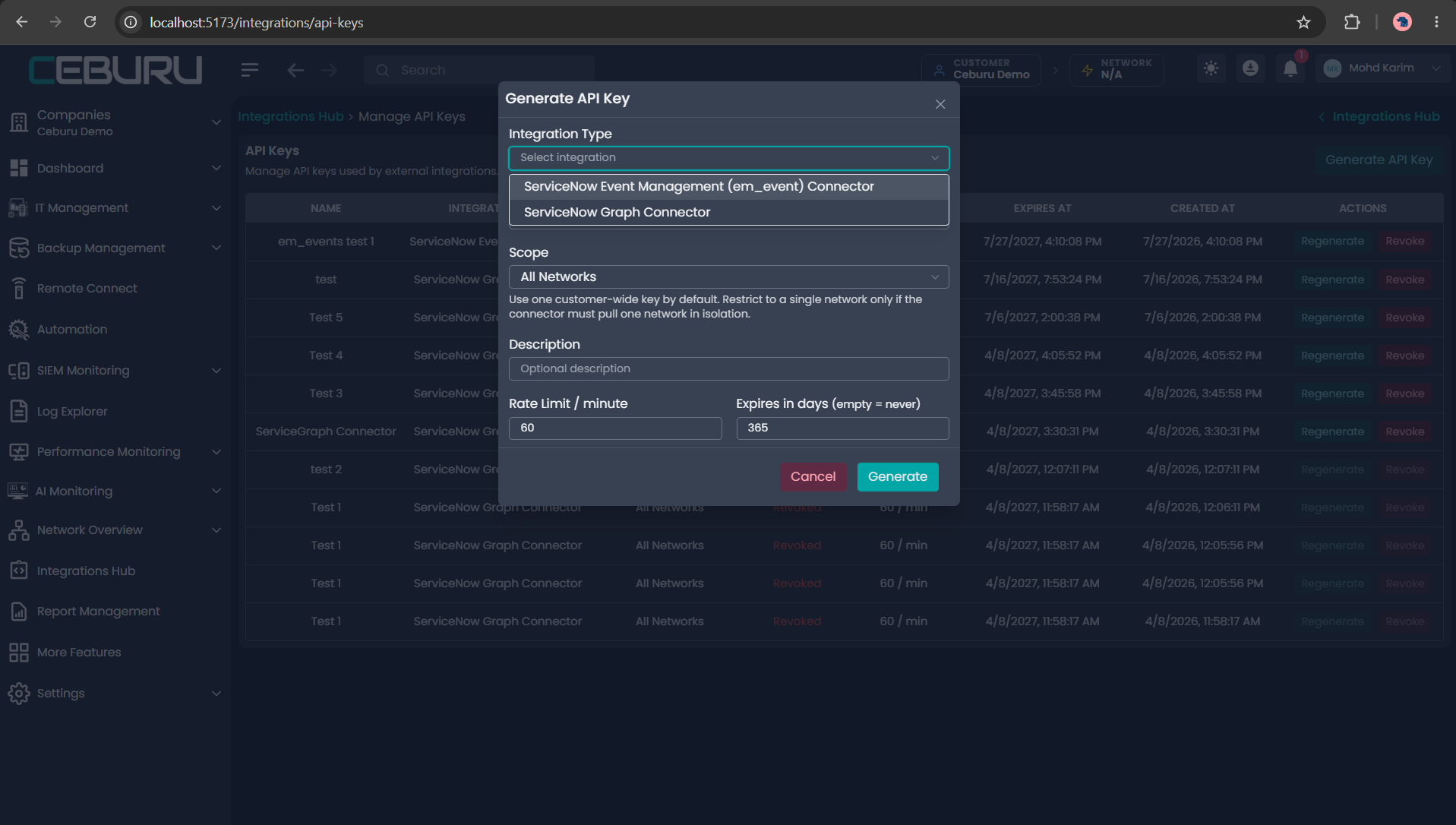
This selection creates an internal em_events_connector key and automatically allows only the alarms endpoint.
4. Complete the key settings
| Field | Recommended value | Guidance |
|---|---|---|
| Integration Type | ServiceNow Event Management (em_event) Connector | Required; isolates the key to the alarms API |
| Name | Production ServiceNow EM Events or a pre-release equivalent | Identify environment and owner clearly |
| Scope | All Networks | Recommended when one ServiceNow connector represents the customer |
| Scope | One named network | Use only when event collection must be isolated to that network |
| Description | Connector purpose, ServiceNow instance, and pre-release status | Optional but recommended |
| Rate Limit / minute | 60 | Current UI default; tune only after release testing |
| Expires in days | 365 or customer policy | Current UI default is 365; an empty value means no automatic expiration |
Annotated API key form fields
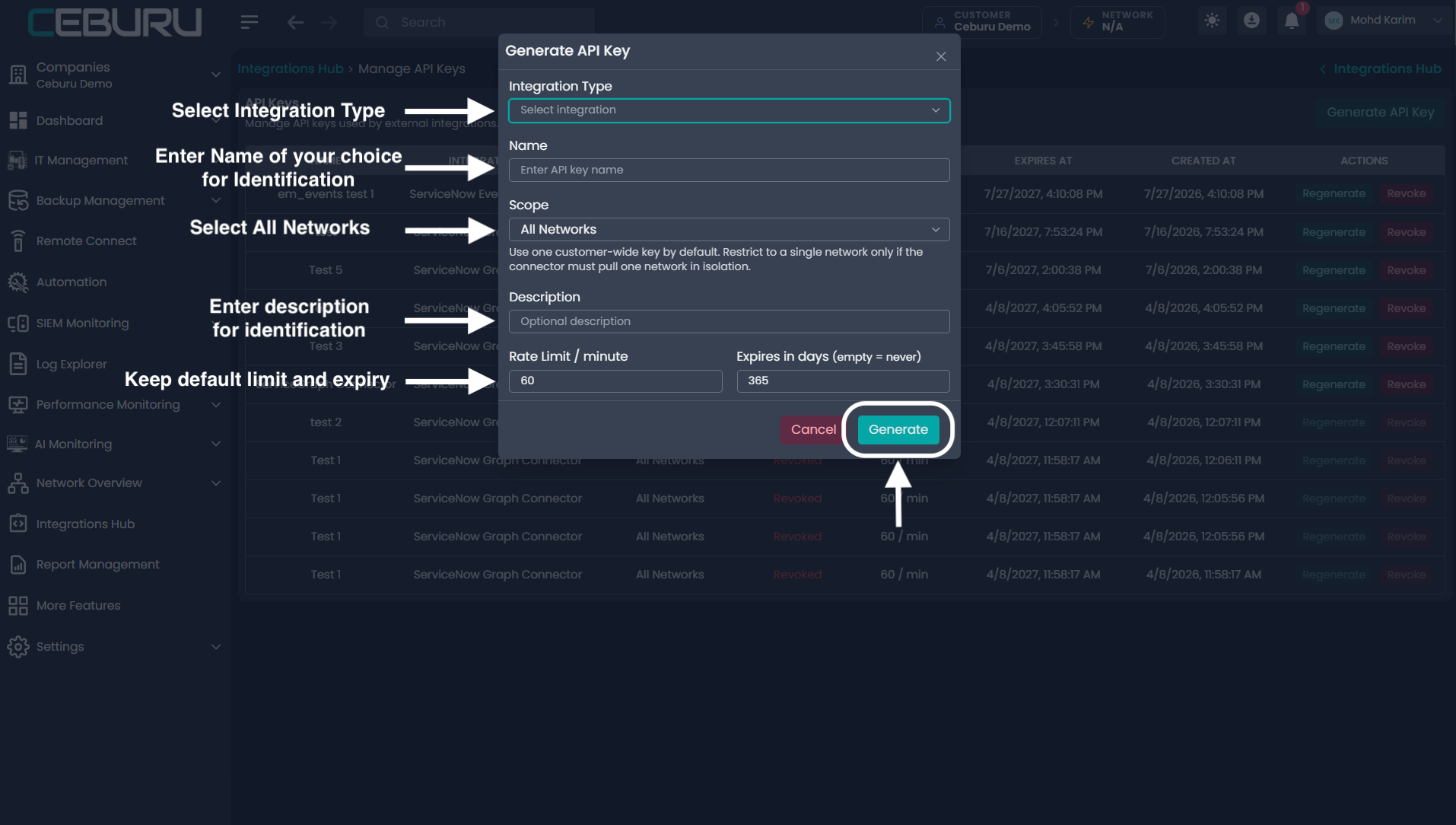
Select Generate.
5. Copy and protect the raw key
The raw key appears once. Select Copy & Close, then place the value in the approved encrypted credential or secret store.
One-time API key notice after successful generation
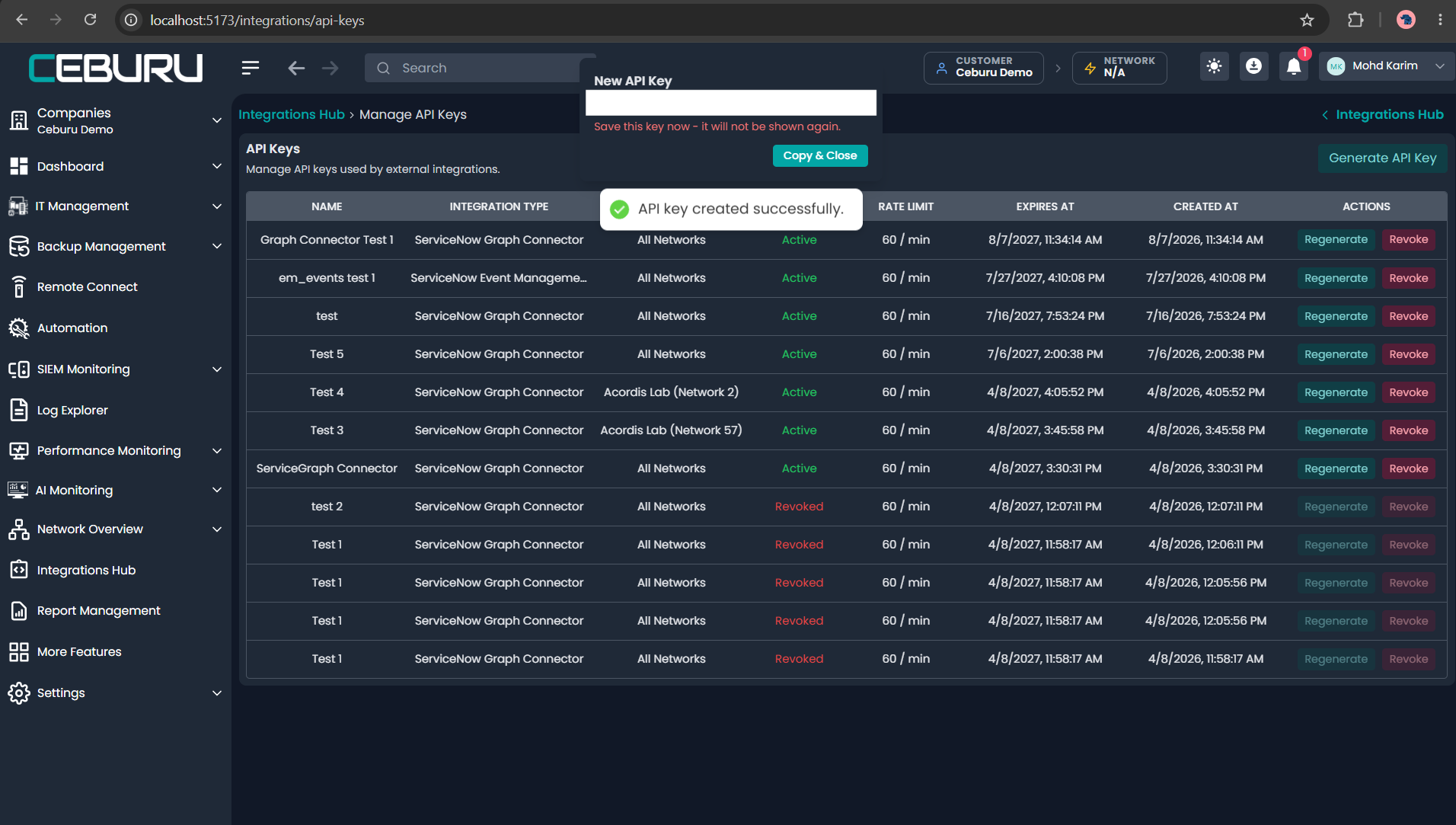
Do not place the key in screenshots, tickets, source control, query parameters, application logs, or ServiceNow ECC Queue payloads.
6. Hold production activation until release
Creating the key does not mean the connector is released. Until the release owner approves production use:
- Do not enable a scheduled ServiceNow collection job.
- Do not treat sample or development responses as a production SLA.
- Do not distribute the connector as generally available.
- Keep any test key scoped and stored as a normal secret.
Intended alarms API contract
The EM Events key is intended to call one endpoint only:
GET /integrations/em-events/v1/by-customer/
| Connector key | Allowed endpoint |
|---|---|
em_events_connector | /integrations/em-events/v1/by-customer/ |
No Service Graph endpoints are assigned to this key. A cross-connector request should return HTTP 403.
Authentication:
Authorization: Bearer <integration-api-key>
 Accept: application/json
The API key identifies the customer. Do not add a customer ID to override its scope.
Supported query parameters:
| Parameter | Required | Behavior |
|---|---|---|
updated_after | No | Exclusive lower synchronization watermark in ISO-8601 UTC |
updated_before | No | Inclusive fixed upper watermark in ISO-8601 UTC; omitted values use server time and future values are clamped to server time |
limit | No | Page size; default 50, maximum 200 |
offset | No | Zero-based number of records skipped; default 0 |
network_id | No | Optional restriction within the key’s customer/network scope |
source_type | No | all (default), standard, or advanced |
status | No | all (default), open, or resolved; scheduled collection should use all |
Required synchronization behavior
Offset pagination must run inside a fixed time window so events cannot move between pages while a poll is in progress.
last_cursor = previous successful sync.next_cursor
 request first page with updated_after = last_cursor
 server fixes updated_before for this run

repeat:
    submit every event in the current results page
    if next is not null, request the complete next URL

after every page and submission succeeds:
    save sync.next_cursor as the new last_cursor
Rules:
- The window is
last_modified > updated_afterandlast_modified <= updated_before. - Advance the cursor only after every page and every ServiceNow submission succeeds.
- Retry the same window after a failure.
- Keep
source_type=allandstatus=allfor scheduled lifecycle collection. - Reuse the server-supplied
nextURL; it preserves filters and the fixed window. - Use the stable
message_keyto make retries idempotent.
Intended ServiceNow event contract
Each result is shaped for ServiceNow em_event ingestion.
| Field | Rule |
|---|---|
source | Constant Ceburu |
event_class | Customer/source context, such as Ceburu customer 24 |
node | CMDB-matchable device/host name or address when available |
type | Event category |
resource | Affected device, interface, disk, certificate, ISP, or other component |
metric_name | Specific alarm or measured condition |
message_key | Stable identity: ceburu:<customer_id>:<record_type>:<record_id> |
severity | ServiceNow string value 0 through 5 |
description | Human-readable alarm detail |
time_of_event | UTC in yyyy-MM-dd HH:mm:ss format |
resolution_state | New for active events; Closing for resolved events |
additional_info | Stringified JSON containing Ceburu correlation and lifecycle context |
Lifecycle mapping
| Ceburu action | Same message_key? | Severity | resolution_state |
|---|---|---|---|
| Create | Yes | 1–5 | New |
| Update | Yes | Current 1–5 | New |
| Resolve | Yes | 0 | Closing |
Acknowledgement is an update, not a resolution. It may appear in additional_info, but it must not close the ServiceNow alert.
Severity mapping
| Ceburu condition | ServiceNow value |
|---|---|
| Resolved, reset, or clear | 0 — Clear |
| Critical | 1 — Critical |
| Major | 2 — Major |
| Average or minor | 3 — Minor |
| Warning | 4 — Warning |
| Informational, OK, or unknown active condition | 5 — OK |
CI binding should use the same hostname, FQDN, IP, or MAC identity that the Service Graph connector placed in the CMDB. Supplemental identifiers such as ci_correlation_key, network_map_id, device_id, network_id, and entity_ip belong in the stringified additional_info value, never in custom em_event columns.
Credential lifecycle
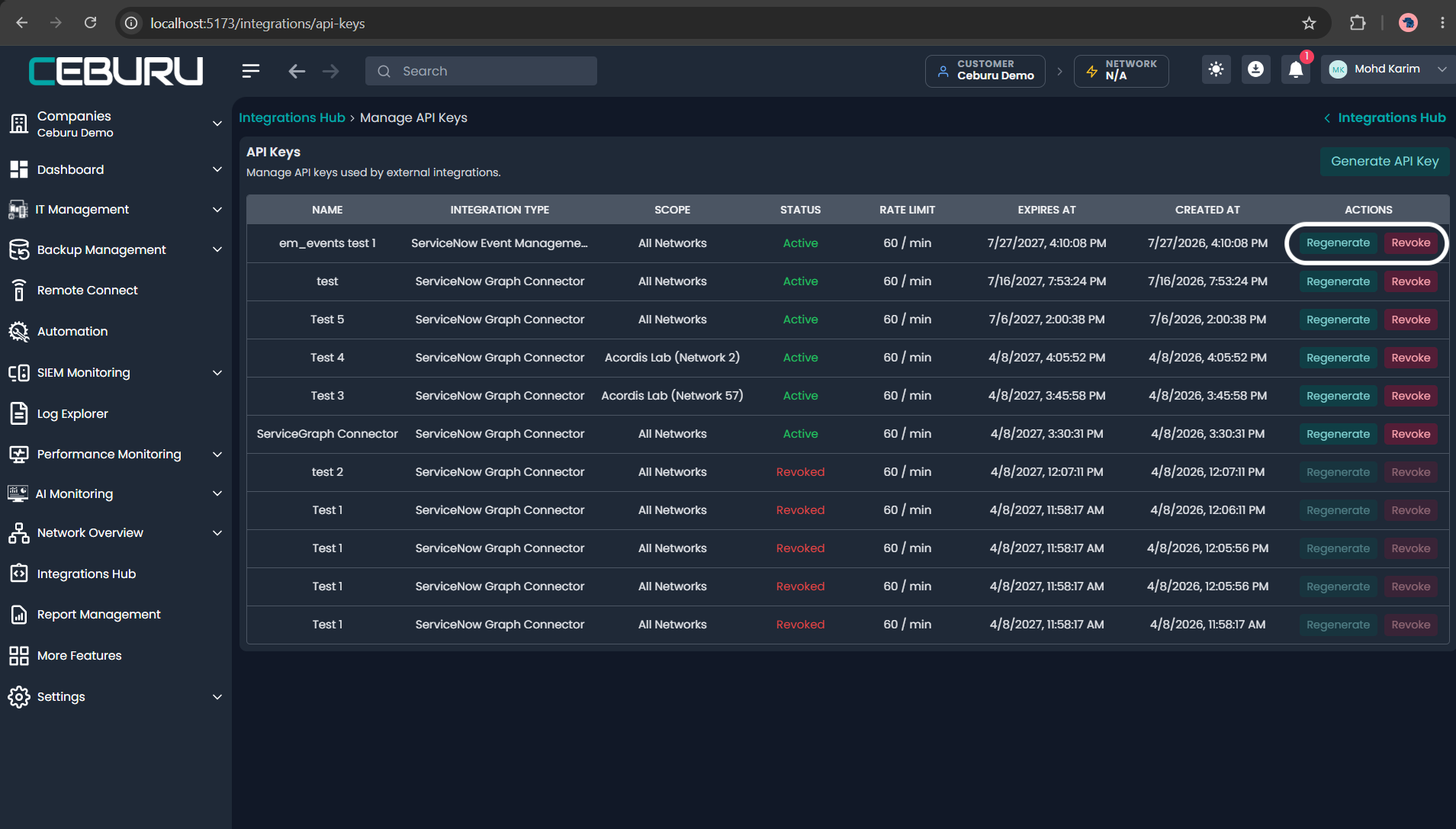
Use Regenerate to replace a key. The old raw value becomes invalid immediately. Update the encrypted ServiceNow credential and retest before enabling the next run.
Use Revoke when a test is complete, a connector is retired, or a key may be exposed.
Regenerate and Revoke actions for API keys
Troubleshooting
| HTTP status | Meaning | Action |
|---|---|---|
200 | Request succeeded | Process the page and follow next |
400 | Invalid filter or synchronization window | Correct the ISO-8601 values or supported filter value |
401 | Missing, invalid, revoked, regenerated, or expired key | Correct or replace the credential |
403 | Wrong key type, endpoint, customer, or network scope | Use an EM Events key and the single alarms endpoint |
429 | Per-key rate limit exceeded | Stop immediate retries and retry with backoff |
500–599 | Ceburu/server failure | Retry the same window without advancing the cursor |
Release-gate checklist
- Product/release owner confirms that the EM Events connector is ready in the target environment.
- The key type is ServiceNow Event Management (em_event) Connector.
- The key can call only
/integrations/em-events/v1/by-customer/. - A Graph endpoint returns
403when tested with this key. - The raw key is stored only in an encrypted credential.
- Initial and incremental windows collect create, update, and resolve lifecycle records.
- Pagination preserves the fixed
updated_beforevalue. - The cursor advances only after all pages and ServiceNow submissions succeed.
- A resolution reuses the original
message_key, sends severity0, and usesClosing. - Events bind to CIs created by the Service Graph connector.
- Rotation, expiration monitoring, and revocation ownership are documented.
Was this article helpful?
That’s Great!
Thank you for your feedback
Sorry! We couldn't be helpful
Thank you for your feedback
Feedback sent
We appreciate your effort and will try to fix the article